During this week, the actual circuit is constructed and the focus was to connect the LM 7596, Arduino UNO and the servo motor. Below are the picture of servo wire construction on going but not yet install at the project body as it is not begin yet;
Note that the circuit is not running yet due to incomplete circuit construction as it will be done when the project body is fabricated. This is an early stages of circuit construction and not fully measure to the project body or mainframe.
Friday, August 16, 2019
Thursday, August 8, 2019
Week 3 - Circuit construction finalize in Proteus
During this week, the circuit from FYP1 will be used and it is finalize, but it is not functioning even after converting the coding into HEX file, it shows error as the functioning wifi is not in the software so it cannot function unless working wifi is available in PROTEUS. So the project will be constructed without simulation.
Below is the recap on the circuit
At the same time, some of the part is bougt, which is the
- Arduino UNO
- Servo Motor
- Wifi Module
- Ultrasonic sensor
Wednesday, July 31, 2019
Week 2 - FYP2 Introductory Briefing
Title : First FYP Briefing
Activity :
On 31/7/2019(Wednesday), FYP2 introductory briefing was conducted. The briefing was conducted in TTL G04 and the attendance is compulsory.
The briefing was conducted by Sir Imran and announce that he is the updated FYP advisor.
Objective and content of briefing :
- To explain about FYP2 calendar
- To inform student to update their project frequently
- To update the FYP2 Title changing (if needed)
- To explain about Project Assessment
- To announce the Presentation day
- To inform the Submission date of project
Saturday, July 27, 2019
Week 1 - FYP2 Recap, Downloading and Installing Software
A quick recap on this Sorting and Monitoring of Recycle Item, basically this project will maintain the same title as before as it is more clear to use the function of the project as a title. The main function is still to detect and sort the general waste and aluminium or metal waste, Moreover it will be having a monitoring function to monitor the trash level. As decided the body of the project will be using a wood as this is just a prototype. It will also maintain all the function, software, hardware use as previous presented on FYP 1
As a start, I downloaded and updated all the software needed for this project because some of the software installed in my laptop is not in use for some time and cannot be use anymore. This week is also use to recap and get familiarize back with the software in order to develop the project. Below are the example of sofwares to be used. Below are the software downloaded and used;
1) Proteus
I used proteus for the circuit design and to simulate the circuit and check whether there is an error or not. Moreover, it is compatible with arduino software that I am using. As u can see from previous picture, my circuit is constructed using this software.
2) Arduino
I use this software to write the program of the project .Furthermore i use this Arduino also simplifies the process of working with microcontrollers, but it offers some advantage for teachers, students, and interested amateurs over other systems:
2. Cross-platform - The Arduino software runs on Windows, Macintosh OSX, and Linux operating systems. Most microcontroller systems are limited to Windows.
3. Simple, clear programming environment - The Arduino programming environment is easy-to-use for beginners, yet flexible enough for advanced users to take advantage of as well. For teachers, it's conveniently based on the Processing programming environment, so students learning to program in that environment will be familiar with the look and feel of Arduino
4. Open source and extensible software- The Arduino software is published as open source tools, available for extension by experienced programmers. The language can be expanded through C++ libraries, and people wanting to understand the technical details can make the leap from Arduino to the AVR C programming language on which it's based. Similarly, you can add AVR-C code directly into your Arduino programs if you want to.
5. Open source and extensible hardware - The Arduino is based on Atmel's ATMEGA8 and ATMEGA168 microcontrollers. The plans for the modules are published under a Creative Commons license, so experienced circuit designers can make their own version of the module, extending it and improving it. Even relatively inexperienced users can build the breadboard version of the module in order to understand how it works and save money.
Friday, June 14, 2019
Week 15 - 17 Report Submission and Blog Updated
During this whole week the focus stay on drafting the report for proposal and submitted to supervisor for the plagiarism check, below are the attempt of the plagiarism check
Chapter 1 First Plagiarism Check
Chapter 2 First Plagiarism Check
Chapter 3 First Plagiarism Check
and after the result of plagiarism check is not convincing Supervisor ask to repair and submit a full compiled report for next plagiarism check.
Full Report PlagiarimCheck Result
With the result of 4% the hardcover is submit later on 12th JUNE 2019
The blog is also finished and updated during this 3 weeks period
Friday, May 10, 2019
Week 13 - FYP1 Proposal Defense Day (8/5/2019)
By this week all preparation and focus stay on the presentation slide and the slide is later on shows to supervisor;
Friday, May 3, 2019
Week 12 - Simulation and Drawing
This is a week before presentation day, so i focuse on designing the proteus circuit which dont have the coding yet, but roughly this is the circuit and connection use to develop the project;
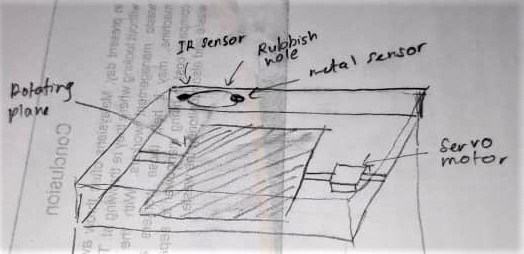
Next is the drawing of the project, the sketching below show how the sorting plane should be functioning:
Subscribe to:
Posts (Atom)